Modern Ops: Gun Shooting Games
Edkon Games GmbHAction
4.739.73K Reviews
- Version
- 10.12
- Installs
- 100.00M
- Age Rating
- Teen
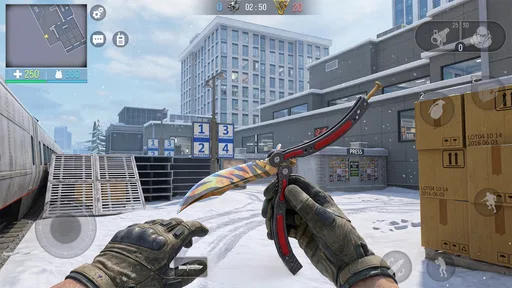
Screenshots
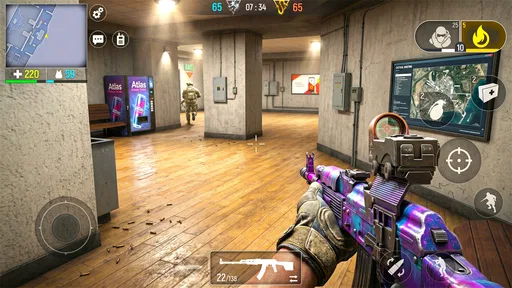
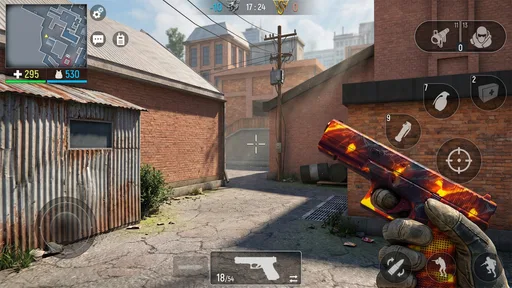
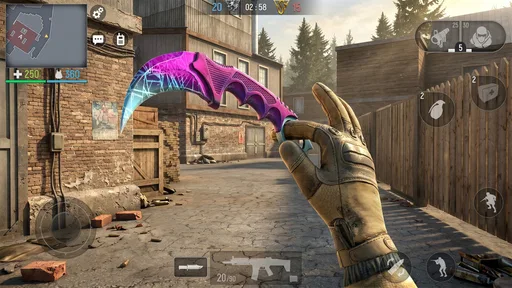
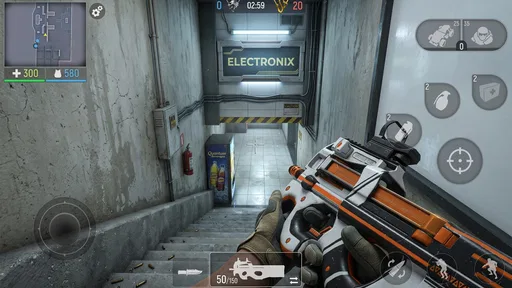
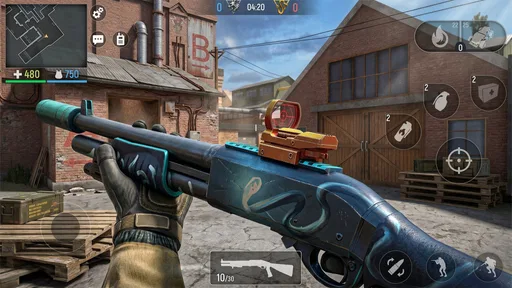
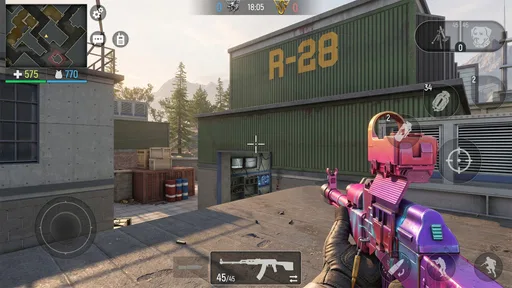
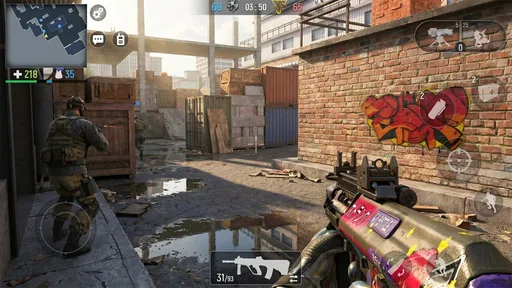
Our Review of Modern Ops: Gun Shooting Games
 Analysis by Appyee
I’d go into Modern Ops: Gun Shooting Games expecting a fast-moving mobile shooter built around competing against other players, not a slow, story-led campaign. Its appeal is easy to understand: get into a match, learn the feel of aiming and moving on a touchscreen, and improve through repeated fights. My main advice for a first session is to treat it as practice rather than a test of skill. Early mistakes are part of learning the maps and controls, and a useful first goal is simply to stay aware of where the action is happening.
This is an action game from Edkon Games GmbH, and its popularity means it is not a niche experiment: it has passed 100 million installs and has a 4.7 average from around 1.5 million ratings. It is free to start, with optional in-app purchases, so you can try the basic experience before deciding whether it suits you. The game is rated Teen, a useful point for families considering whether its gun-based combat is appropriate for a younger player.
What a first-time player should expect
The core attraction is the rhythm of a multiplayer shooter: watch the space around you, choose when to move, and react quickly when an opponent appears. Modern Ops is most satisfying when I focus on readable decisions instead of trying to sprint into every encounter. A short match can still feel hectic, but that pressure is part of the appeal for someone who wants direct action without first settling into a long single-player story.
Compared with slower tactical shooters, this kind of mobile action is easier to pick up in brief bursts, though it asks you to make peace with touch controls and a busy screen. Compared with very casual arcade shooters, the online competition gives each encounter more consequence: opponents are making their own choices, so a familiar route or careless push can be punished. If you want a carefully paced campaign, a relaxed offline activity, or a game where planning matters more than quick reactions, another style of shooter may fit better.
Getting comfortable before chasing wins
When you first open the game, I’d spend a moment looking over the menus and settings before jumping into a match. Check where loadouts are managed and where control options live, then make only one adjustment at a time if something feels awkward. That small pause is more useful than changing several things at once, because you can tell what actually helped. The game is on version 9.72 and supports Android 8.0 or later; on iOS, check the relevant store page for device compatibility before installing.
For the first few rounds, use a simple routine: keep the camera moving in controlled sweeps, avoid staring only at the crosshair, and pause briefly before turning a corner. If you are repeatedly caught while crossing open ground, try moving between cover rather than taking the same direct route again. That is a practical way to learn a map without needing to memorize every angle. It also helps separate a control problem from a positioning problem: if you spot opponents but cannot track them, practice aim; if you rarely see them first, pay more attention to routes and sightlines.
Finding the first meaningful success
I’d define an early win more broadly than topping a scoreboard. Spotting an opponent before they surprise you, choosing a better route after a quick defeat, or contributing to a team fight are all signs that you are beginning to read the match. A realistic use case is a short break after school or work: play a round, notice one mistake, and carry one small lesson into the next rather than trying to overhaul your whole play style at once.
If you play with friends, coordinating a simple plan can make the first matches feel less chaotic. Agree to stay near one another or watch different approaches, rather than everyone rushing off alone. With strangers, brief, practical communication is more useful than trying to direct every move. Online chat can make teamwork livelier, but it also means the experience is less controlled than playing alone; if you prefer quiet sessions, check the available sound and communication settings before settling in.
Weapons, maps, and decisions that matter
The range of weapons gives you room to try different approaches, but I would resist changing equipment after every disappointing round. Give a weapon enough time to learn its handling, then ask whether the problem is its range, your positioning, or simply unfamiliarity. A long-range option is not automatically better if you keep entering close encounters, and an aggressive setup can feel wasted when you are trying to hold a distant angle. Skins are a visual choice; attachments and other loadout changes deserve more thought because they can affect how a weapon fits your habits.
Maps reward looking for cover, alternate routes, and useful sightlines rather than treating each arena as a straight corridor. One non-obvious habit that helps is to remember where you were exposed when you lost a fight, not just where the opponent appeared. On the next attempt, approach that area from another direction or wait for a safer moment. This turns a loss into information and is more reliable than repeating the same push and hoping to react faster.
Where the friction shows up
Touch aiming can take patience, especially if you are used to a controller, mouse, or keyboard. Even responsive controls do not remove the challenge of tracking a moving target with your thumbs, and a cramped grip or rushed camera movement can make a close fight feel unfair. I would try a few matches before judging the controls, but I would also be honest with myself: if aiming on a phone remains uncomfortable, a shooter designed for a larger screen or physical input may be a better fit.
Purchases are another point to approach deliberately. The game is free to play, while optional items range from $0.99 to $194.99 per item. That wide span is a reason to set a spending limit before browsing, not an indication that spending is required to enjoy a match. I’d first learn what the regular play loop feels like and avoid buying anything just because a loss made an upgrade seem urgent. If you are setting this up for a younger player, the Teen rating and the possibility of online interaction are worth discussing together.
Gameplay and Features
First off, the game offers a range of intense and thrilling modes that will keep you on your toes. Modern Ops: Gun Shooting Games has an online multiplayer mode that lets you team up with friends or strangers. Trust me, the competitive edge this adds is off the charts.
One of the first things I noticed was the variety of weapons. From assault rifles to sniper rifles and everything in between, the arsenal is impressive. And let's not forget the customization options! You can pimp out your weapons with a bunch of different skins and attachments. Each little tweak can make a big difference in your gameplay.
Then there are the maps. They're well-designed, offering multiple vantage points and hiding spots. Whether you're a sniper at heart or prefer close-combat action, there's a map that suits your play style. The graphics are crisp, and the attention to detail is commendable, making each battle feel immersive.
Controls and User Interface
Now, let's talk about controls. They're intuitive and responsive, which is super important for a shooter game. Nobody wants to miss a shot because the controls are too clunky, right? The user interface is straightforward, with easy navigation through menus and quick access to your loadouts and settings. This is a big win for those who, like me, hate spending too much time fiddling with options when you just want to jump into a match.
Community and Interaction
The community aspect of the game is also worth mentioning. You can chat with teammates and opponents, making the whole experience more interactive. It's always fun to strategize with your team or engage in a bit of friendly banter with the enemy squad.
In-App Purchases and Monetization
On the downside, there are in-app purchases. But hey, that's pretty standard these days. You can definitely enjoy the game without spending a dime, but if you're impatient, buying some upgrades might be tempting. Just be cautious—it can add up quickly!
Final Thoughts
Overall, Modern Ops: Gun Shooting Games offers a thrilling experience for both casual players and hardcore shooter fans. The graphics, gameplay mechanics, and community interaction make it a standout in the sea of mobile shooters. Whether you're in it for the competition or just to blow off some steam, it's worth a download.
Give it a shot and let me know what you think. Just be prepared to get hooked!
Choosing whether to stick with it
After you have learned the basic controls and explored a few maps, the next question is whether the match-by-match format keeps you interested. I find it works best for people who enjoy improving through small, visible decisions: taking a different lane, checking a sightline, or resisting the urge to chase an opponent into an unfamiliar area. If you prefer a game that tells a long story or offers a quiet solo routine, the online focus may feel like a limitation rather than a benefit.
For a first-time player, I would give the game a fair trial without treating purchases or a quick win as prerequisites. Keep the first sessions short, change one setting or loadout choice at a time, and decide based on whether the moment-to-moment firefights feel enjoyable on your device. That makes it easier to tell whether the competitive pace is genuinely your kind of fun.
Privacy and Permissions
See what permissions an app requests and how it handles your data.
- Photos/Media/Files
- read the contents of your USB storage, modify or delete the contents of your USB storage
- Storage
- read the contents of your USB storage, modify or delete the contents of your USB storage
- Wi-Fi connection information
- view Wi-Fi connections
- Other
- view network connections, full network access, control vibration, prevent device from sleeping, Google Play license check
Verdict
Strengths of Modern Ops: Gun Shooting Games
- Intuitive controls and smooth gameplay.
- Wide variety of weapons to choose from.
- Regular updates with new content.
- Engaging multiplayer mode.
- Impressive graphics for mobile devices.
Limitations of Modern Ops: Gun Shooting Games
- Occasional in-app purchase prompts.
- Some players experience lag issues.
- Limited offline gameplay options.
- Can be addictive for younger audiences.
- Requires stable internet connection.
Other Releases by Edkon Games GmbH
View All
World War 2-FPS Shooting Games
Action4.4
Similar Picks in This Category
View All
Temple Run 2: Endless Escape
Imangi Studios4.1

PUBG MOBILE
Level Infinite4.3

Free Fire: 9th Anniversary
GARENA INTERNATIONAL I4.4

Talking Tom: Hero Dash Run
Outfit7 Limited4.3

slither.io
Lowtech Studios3.9

Sniper 3D:Gun Shooting Games
Wildlife Studios4.6
Frequently Asked Questions
What is Modern Ops: Gun Shooting Games?
Modern Ops: Gun Shooting Games is a free-to-play online multiplayer first-person shooter available on Android and iOS. Players engage in fast-paced battles, utilizing a variety of weapons and strategies to defeat their opponents. The game features multiple modes and maps, providing a dynamic and engaging experience for shooter enthusiasts.
What are the main features of Modern Ops?
Modern Ops offers a range of features including over 30 modern guns, customizable loadouts, and multiple game modes such as Team Deathmatch and Defuse the Bomb. Players can join clans, participate in ranked matches, and enjoy excellent 3D graphics that help create an immersive shooting experience.
Is Modern Ops free to play, and are there in-app purchases?
Yes, Modern Ops is free to download and play. However, it includes in-app purchases for players who wish to enhance their experience by buying weapons, skins, and other premium items. While these purchases can provide advantages, they are not necessary to enjoy or succeed in the game.
What are the system requirements for Modern Ops?
To run Modern Ops smoothly, Android users need a device with Android 5.0 or higher, while iOS users need iOS 9.0 or later. A stable internet connection is also essential for multiplayer gameplay. Ensuring your device meets these requirements will provide the best gaming experience.
How does Modern Ops handle player security and data privacy?
Modern Ops takes player security and data privacy seriously. The game uses secure servers to protect user data and has a privacy policy that outlines how personal information is handled. Players are encouraged to review the privacy policy to understand how their data is managed and to ensure a safe gaming experience.
Play our best games!


